
Redirect an obsolete URL to a real replacement, canonicalize an accessible duplicate, noindex an accessible page that should not appear in search, use robots.txt only to manage crawling, require authentication for private content, and return 404 or 410 when a resource is genuinely gone without a replacement.
- Start with the intended user, crawler, and search outcome instead of selecting a familiar SEO tag.
- Canonicals consolidate accessible duplicates, while redirects replace the source URL with another destination.
- A robots.txt block does not reliably remove a URL from search and can prevent a crawler from seeing noindex.
- Private information requires access control rather than search-engine directives.
01
Definition
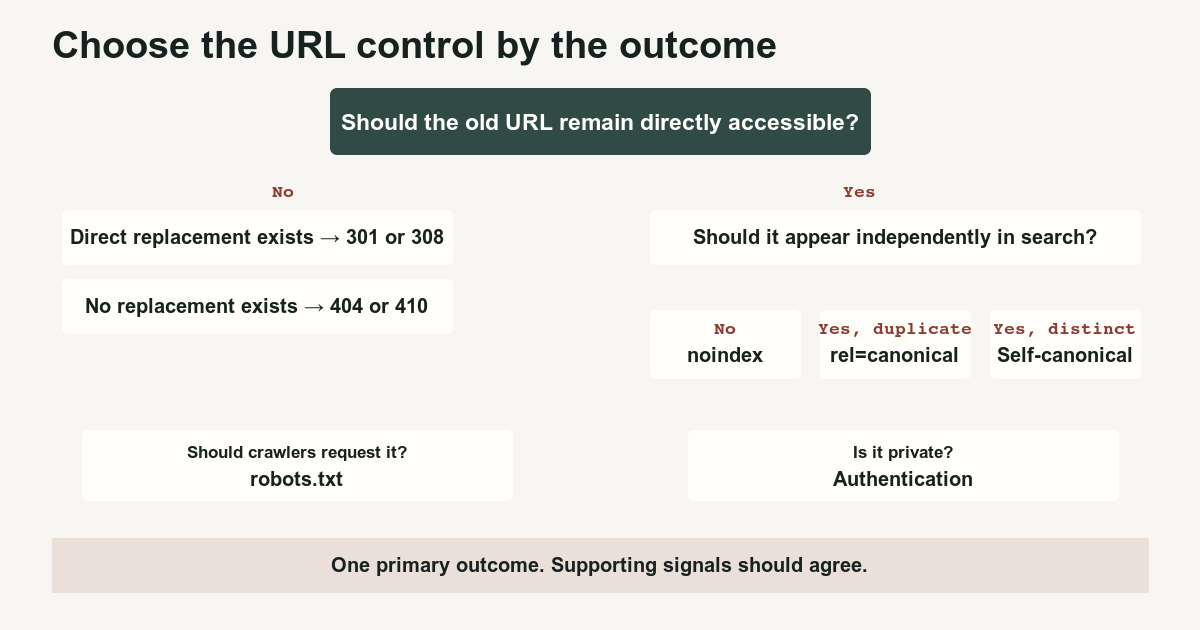
A page can be duplicated, moved, hidden from search, blocked from crawling, protected from unauthorized users, or removed entirely. Those are different states. They require different controls.
The quickest way to create a technical mess is to begin with a favorite tag rather than the desired outcome. A team adds a canonical because the URL looks duplicated, adds noindex because it wants the page gone, blocks the URL in robots.txt because crawling seems wasteful, and then redirects it because somebody finally notices that users should reach another page. The resulting signals do not describe one coherent state.
Use this operating rule:
- Redirect when the original URL should give way to another destination.
- Canonicalize when the original URL must remain accessible but represents duplicate or substantially similar content.
- Use
noindexwhen the page must remain accessible but should not appear in supporting search engines. - Use robots.txt when the objective is to manage crawler access.
- Require authentication when the information is private.
- Return
404or410when the resource is gone and has no suitable replacement.
Google treats redirects and rel="canonical" annotations as strong canonicalization signals, while sitemap inclusion is weaker. None of those mechanisms is a privacy system. How to specify a canonical URL with rel=canonical and other methods[1]
02
Mechanism
Begin with three questions.
Should users still access the original URL?
If the answer is no and a genuine replacement exists, redirect the original URL.
A permanent server-side redirect tells clients that the resource has moved. Google describes 301 and 308 as permanent redirect types and uses a permanent redirect as a canonicalization signal toward the target. Temporary redirects such as 302 and 307 are appropriate when the alternate destination is temporary. Redirects and Google Search[2]
At the HTTP level, 307 and 308 require the client to preserve the request method during automatic redirection. Historical behavior permits a client to change POST to GET after a 301 or 302. That distinction matters for forms, APIs, uploads, and other non-GET requests, although ordinary page navigation usually uses GET. RFC 9110: HTTP Semantics[5]
If users must continue reaching the original URL, do not redirect merely to manipulate search behavior. Decide whether the accessible page is a duplicate, an independently useful page, or a page that should be excluded from search.
Should the page remain independently eligible for search?
An accessible duplicate can declare a preferred representative with rel="canonical".
Typical cases include:
- Tracking-parameter versions
- Print views
- Alternate sorting views
- Duplicate product routes
- Syndicated copies
- Hostname or protocol variants during cleanup
A canonical is not a command to delete the alternate URL. Users and crawlers can still request it. Google can also select another canonical when the declared target conflicts with content, links, redirects, sitemaps, or other signals.
If the page must remain accessible but should not appear in search, use a robots meta tag or X-Robots-Tag header containing noindex. Google must be able to crawl the resource and extract the rule before it can process it. Block Search indexing with noindex[3]
Should crawlers request the URL?
Robots.txt governs crawler access. It does not reliably remove a web-page URL from search results. A blocked URL can still be discovered through links and can appear without a normal description because the crawler was not allowed to retrieve the page. Google explicitly recommends noindex, password protection, or removal when the goal is exclusion from search. Introduction to robots.txt[4]
This creates an important sequence problem:
Page is indexed
        ↓
Site adds noindex
        ↓
Site also blocks the page in robots.txt
        ↓
Crawler cannot retrieve the page
        ↓
Crawler cannot see the new noindex rule
When an already known page must be removed from search and later excluded from unnecessary crawling, allow the crawler to retrieve the noindex first. Confirm that the rule was processed before applying a crawl block, if a crawl block remains necessary.
Is the content private?
Use authentication and authorization.
A robots.txt rule is public. A noindex directive is a request to cooperating search engines. A canonical is a duplicate-content signal. None prevents a person, scraper, or disobedient crawler from requesting an otherwise public URL.
Private dashboards, medical records, customer documents, internal reports, and paid resources must be protected before the application returns their contents.
03
Examples
| Situation | Primary control | Supporting cleanup |
|---|---|---|
| HTTP URL moved permanently to HTTPS | 301 or 308 | Update internal links, sitemap URLs, and canonicals |
| Old article replaced by a materially better guide | Permanent redirect | Link directly to the replacement |
| Printer-friendly duplicate must remain usable | Canonical to the principal version | Keep links consistent |
| Tracking parameter returns the same page | Canonical or strip the parameter | Stop generating tracked internal links |
| Account dashboard | Authentication | Add noindex as secondary defense if publicly reachable shell exists |
| Internal search results | Case-specific noindex or crawl control | Bound query-space generation |
| Service temporarily unavailable | 302 or 307 | Restore the original route when service returns |
| Expired product with a direct successor | Permanent redirect | Explain the replacement to users |
| Removed page with no replacement | 404 or 410 | Remove internal links and sitemap entry |
| PDF duplicates an HTML guide | Canonical header or separate treatment | Decide whether both formats deserve search visibility |
| Filter combinations with no search value | Prevent unnecessary crawlable URLs | Normalize and constrain filter links |
| Product variants with distinct intent | Separate stable URLs when justified | Use consistent canonicals and variant links |
A 404 means the server did not find a current representation or is unwilling to disclose one. A 410 is more explicit when the server knows the condition is likely permanent. Neither response needs to be “fixed” when it accurately describes the resource.
Do not redirect every removed URL to the homepage. A redirect should lead to a destination that meaningfully replaces the original request. Otherwise the response can confuse users and search systems while hiding the fact that the content is gone.
04
Boundaries
A URL-control decision is not complete until the surrounding signals agree.
Check all of these:
- HTTP response
- Redirect destination
- Canonical annotation
- Robots
metatag X-Robots-Tag- Robots.txt rule
- Internal links
- Sitemap inclusion
- Structured-data URLs
- Alternate-language annotations
- Navigation and breadcrumbs
Avoid these combinations:
- A robots-blocked URL that relies on a newly added
noindex - A redirecting URL that remains in the XML sitemap
- A canonical target that is itself noindexed
- A canonical that points through one or more redirects
- A chain of canonicals
- Different canonicals in HTML and HTTP headers
- A canonical target with materially different content
- A redirected URL that still receives prominent internal links
- A private page protected only by robots.txt
Use the canonical fundamentals guide when the only question is how canonical annotations work. Use the page-with-redirect guide when Search Console reports a redirecting URL. Use the noindex guide or robots.txt blocking guide when one of those controls is already producing an indexing status.
For query-string inventories, continue with URL Parameters and SEO. During a migration, use the SEO migration launch checklist to align redirects, links, sitemaps, and canonicals at release time.
The durable rule is not “always use a canonical” or “redirect everything.” It is simpler: define the intended state of the original URL, choose the mechanism that directly creates that state, and remove signals that describe a different one.
References
Sources behind this record
- How to specify a canonical URL with rel=canonical and other methods — Google (accessed July 29, 2026)
- Redirects and Google Search — Google (accessed July 29, 2026)
- Block Search indexing with noindex — Google (accessed July 29, 2026)
- Introduction to robots.txt — Google (accessed July 29, 2026)
- RFC 9110: HTTP Semantics — RFC Editor (accessed July 29, 2026)
Corrections
Correction history
No corrections recorded.
To report an error, use the public corrections path.
Canonical annotations and redirects are signals processed by search systems rather than guarantees of immediate canonical selection, deindexing, recrawling, or ranking behavior.