
Important destinations should render as anchor elements with resolvable href values. JavaScript can enhance the interaction, but buttons, spans, click handlers, and framework attributes are not dependable substitutes unless the final output contains a normal crawlable link.
- Judge the final HTML output rather than the name of a framework routing component.
- Use links for destinations and buttons for actions.
- Distinct content states need stable resolvable URLs.
- Test initial HTML, rendered HTML, crawl discovery, destination responses, and server logs.
01
Definition
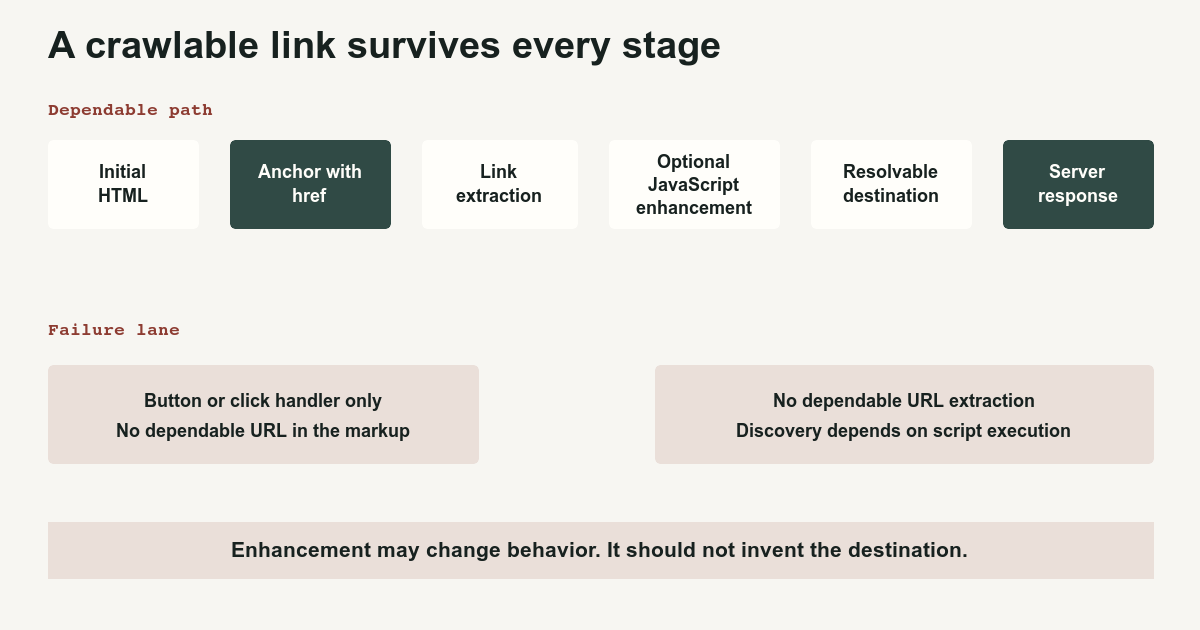
A clickable interface element is not automatically a web link.
A human can click a button, a styled div, a router component, a card, or a span with a JavaScript event. A crawler needs a dependable destination it can extract and request.
Google says it can generally crawl links implemented as <a> elements with href attributes that resolve to actual web addresses. It cannot reliably extract destinations from anchors without href, tags pretending to be links, or script-event navigation. SEO link best practices for Google[1]
Use this as the base contract:
<a href="/products/shoes">Shoes</a>JavaScript may intercept the click for client-side navigation, preload data, animate the transition, update application state, or record an event. The destination must still exist as an ordinary URL.
02
Mechanism
Google can discover links during more than one processing stage.
A simplified path is:
Fetch initial HTML
        ↓
Extract links
        ↓
Render JavaScript when needed
        ↓
Extract links from rendered output
        ↓
Request discovered destinations
A link present in the initial server response can be discovered before rendering. A link added during rendering may also be discovered, but now discovery depends on successful script fetching, execution, rendering, and final markup.
That creates a reliability hierarchy.
Reliable anchor
<a href="/products/shoes">Shoes</a>The destination is visible in markup and remains usable without JavaScript.
Progressively enhanced anchor
<a href="/products/shoes" onclick="enhanceNavigation(event)">
  Shoes
</a>
The browser can follow the URL normally. JavaScript improves the experience when available.
Framework component with valid output
A component such as:
<Link href="/products/shoes">Shoes</Link>is acceptable when the actual server or rendered output is:
<a href="/products/shoes">Shoes</a>Do not approve a component because its name contains Link. Inspect the resulting DOM and server output.
Unreliable navigation imitations
<button onclick="go('/products/shoes')">Shoes</button><span onclick="go('/products/shoes')">Shoes</span><a onclick="go('/products/shoes')">Shoes</a><a href="javascript:go('/products/shoes')">Shoes</a>These may work for a user in one browser state. They do not create the same dependable URL-bearing link contract.
03
Examples
Links versus buttons
Use a link when activation navigates to another resource.
<a href="/pricing">View pricing</a>Use a button when activation performs an action in the current interface.
<button type="button" aria-expanded="false">
  Show filters
</button>
A button can open a menu containing links. The destinations inside the menu should still use anchors.
Single-page applications
For distinct content views, use stable paths and the History API.
Google recommends ordinary path URLs rather than fragment-based routes for content that must be discovered. Understand the JavaScript SEO basics[2]
Preferred:
<a href="/products">Products</a>
<a href="/services">Services</a>
Avoid treating fragments as independent pages:
<a href="#/products">Products</a>
<a href="#/services">Services</a>
Client-side code can intercept the first pattern and call history.pushState, but the server must also return a meaningful response when /products is requested directly.
Load more and infinite scroll
A load-more button can improve the interface. It should not be the only route to inventory that needs crawling.
Provide a paginated sequence:
<a href="/articles?page=2">Next page</a>Then enhance the interaction with JavaScript if desired.
See Infinite Scroll and Pagination SEO for the complete inventory pattern.
Card components
This is dependable:
<article>
  <h2><a href="/articles/example-guide">Example guide</a></h2>
  <p>A concise description of the destination.</p>
</article>
Making the whole card clickable with JavaScript is optional enhancement. Preserve a visible anchor containing meaningful text.
04
Boundaries
Test links at every relevant layer.
View the initial response
Use view source or an HTTP client.
Ask:
- Is the destination present?
- Is it inside an anchor?
- Does the anchor contain
href? - Is the URL resolvable?
Inspect rendered HTML
Check the final DOM after scripts execute.
Ask:
- Did hydration remove or replace the anchor?
- Did the router emit a real link?
- Does the destination change only after user interaction?
- Did an error prevent the navigation component from rendering?
Disable JavaScript
A fully interactive application may not function without JavaScript. Important navigation should still expose meaningful URLs where practical.
Crawl the site
Use a crawler that can compare:
- Initial HTML links
- Rendered links
- Status responses
- Redirect targets
- Canonicals
Inspect the destination
A perfect anchor to a 404, redirect loop, blocked page, or empty client shell is not a successful link.
Check request logs
Logs can show whether a crawler requested the destination. They cannot prove indexing or ranking.
Common failure cases include:
- Navigation emitted only after a click
- Links hidden behind authentication
- Router components rendering spans
hrefvalues added after delayed API responses- Broken hydration removing server-rendered anchors
- Blocked JavaScript preventing link generation
- Fragment routes representing distinct content
- Link destinations returning the same empty application shell
- Canonicals rewritten incorrectly after client navigation
Use JavaScript SEO: Crawling, Rendering, and Indexing for the broader lifecycle, Rendered HTML Missing Content for rendering failures, and Orphan Pages SEO when pages appear in a CMS or sitemap but receive no crawlable internal links.
A resilient navigation system begins with the web’s least glamorous and most durable component: an anchor containing a URL.
References
Sources behind this record
- SEO link best practices for Google — Google (accessed July 29, 2026)
- Understand the JavaScript SEO basics — Google (accessed July 29, 2026)
Corrections
Correction history
No corrections recorded.
To report an error, use the public corrections path.
Search crawlers can sometimes infer or discover URLs through other mechanisms, but script-only navigation is not a dependable internal-link contract.