
An orphan page is a URL in the known site inventory that receives no crawlable internal link from another reachable page. Find candidates by comparing several inventories, then decide whether each page should be linked, merged, redirected, noindexed, removed, protected, or deliberately retained.
- A crawler cannot directly report a page it never discovered.
- A sitemap-only URL may be discoverable while remaining disconnected from the internal site structure.
- Orphan detection requires multiple inventories and consistent URL normalization.
- Not every orphan candidate deserves a new internal link.
01
Preconditions
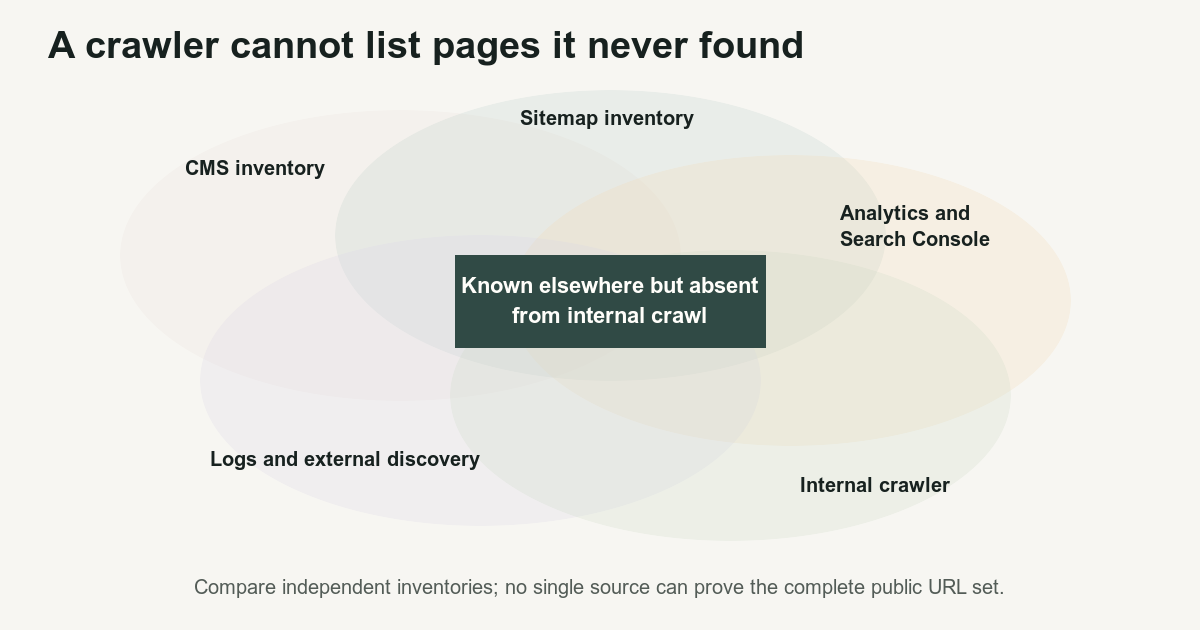
An orphan-page audit requires more than a site crawl.
A crawler begins with seed URLs and follows links. It cannot directly list a page that it never encountered. Therefore, a report labeled “orphan pages” is incomplete when it compares nothing against the crawl.
Collect these inventories:
- Canonical CMS, database, or publication inventory
- XML sitemap URLs
- Internally crawled URLs
- Analytics landing pages
- Search Console pages
- Server or edge log URLs
- External backlink destinations
- Feed URLs
- Migration manifests
- Current redirect mappings
Google recommends that every important page receive a link from at least one other page on the site. SEO link best practices for Google[1]
A sitemap can help crawlers discover preferred URLs, but it does not create navigation, topical context, or an internal path. Google also states that sitemap submission does not guarantee crawling or indexing. Build and submit a sitemap[2]
Before comparing inventories, define the intended public states:
- Indexable page
- Accessible but noindexed page
- Redirect
- Not found
- Private route
- Archived route
- Test or development artifact
- Non-page resource
02
Ordered process
- Export the canonical inventory.
Begin with the system that owns public pages. For Rank Builder, that is the controlled publication registry rather than a crawler export.
Record:
- URL
- Source record
- Lifecycle state
- Canonical target
- Expected response
- Expected topic or parent
- Expected sitemap state
- Expected indexability
- Collect secondary inventories.
Export sitemap URLs, analytics landing pages, Search Console pages, request logs, backlink destinations, and migration records.
Keep the source of every URL. A page appearing only in logs means something different from a page appearing in the CMS and sitemap.
- Normalize URLs.
Define rules for:
- HTTP and HTTPS
wwwand non-www- Trailing slashes
- Case
- Default ports
- Percent encoding
- Parameters
- Fragments
- Redirects
- Canonical groups
Preserve raw URLs before normalization. A normalization error can hide genuine differences.
- Calculate candidates.
Let:
Cbe the CMS or database inventorySbe the sitemap inventoryAbe analytics and Search Console URLsLbe log URLsBbe externally discovered URLsRbe internally crawled URLs
Then:
O = (C union S union A union L union B) minus RThe result O is a candidate set. It is not a list of pages that automatically need links.
- Classify every candidate.
Use the orphan-page audit template.
Assign one category:
- Valuable independent page
- Duplicate
- Replaced page
- Removed page
- Accessible but intentionally excluded from search
- Private page
- Test artifact
- Malformed URL
- Deliberately isolated campaign
- Unknown and requiring investigation
- Select the disposition.
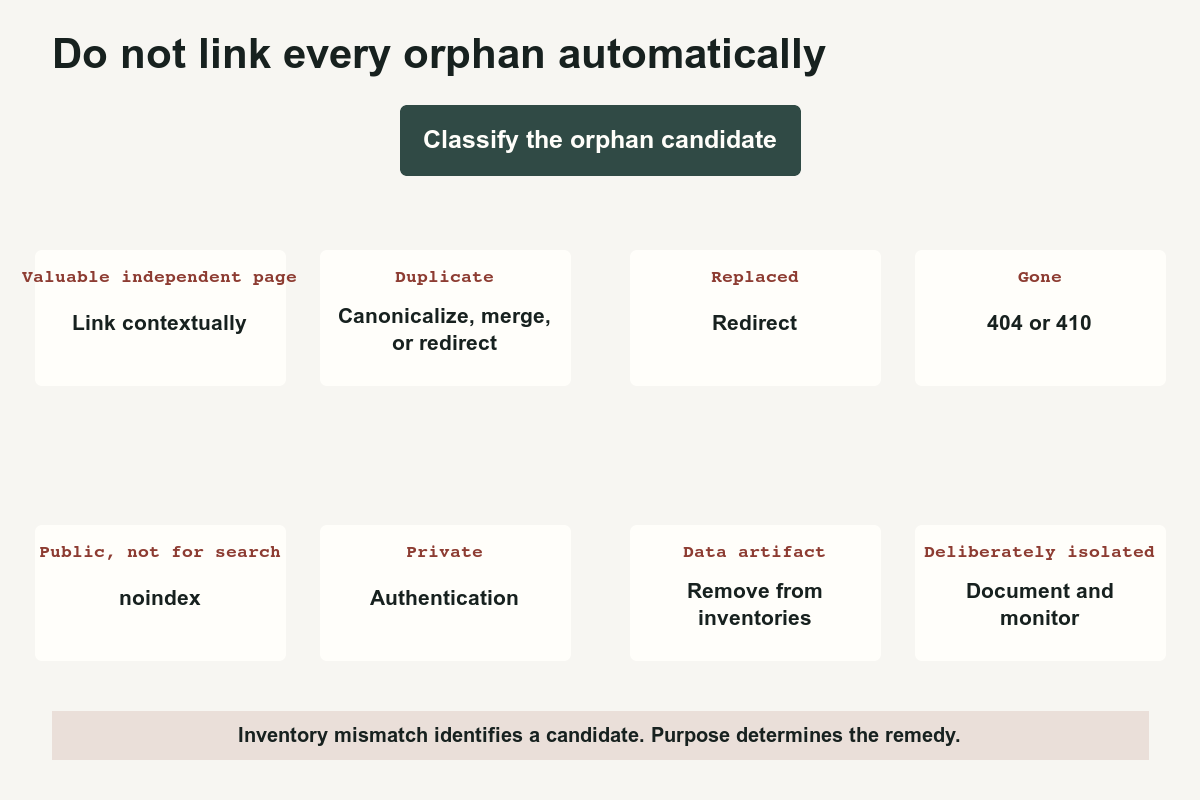
Apply:
- Link contextually when the page is valuable and belongs in the site structure.
- Merge or canonicalize when several pages represent the same resource.
- Redirect when a replacement exists.
- Return
404or410when the page is gone without a replacement. - Use
noindexwhen the public page should remain accessible but not searchable. - Require authentication when the content is private.
- Remove the record when it is a data artifact.
- Document intentional isolation when a campaign page should not join ordinary navigation.
- Repair the generating system.
When many valid pages are orphaned, fix the component that failed:
- Category template
- Topic registry
- Breadcrumb generator
- Related-content algorithm
- Pagination
- Archive route
- JavaScript router
- Publication workflow
- Migration mapping
Adding isolated links one page at a time leaves the repeated defect intact.
- Verify the repair.
Recrawl the site and compare all inventories again.
Confirm:
- Intended pages are reachable
- Links render as anchors with
href - Redirects reach the final canonical destination
- Removed pages are absent from sitemaps
- Private routes remain protected
- No new orphan family appeared
- Every public article has at least one meaningful inbound contextual link
03
Failure cases
Do not classify every sitemap-only URL as broken.
A page can be intentionally absent from ordinary navigation. A legal notice, campaign landing page, downloadable resource, private login shell, or temporary experiment may have a deliberate role. Document the decision instead of forcing it into a topic hub.
Do not solve orphaning by adding thousands of footer links. Sitewide boilerplate can create crawl paths without explaining relationships or helping readers.
Do not trust one URL form. A page may appear orphaned because the crawler found the trailing-slash URL while the CMS exported the nonslash form.
Do not treat a redirecting historical URL as a public page requiring new links. Preserve external equity through the redirect, but point new internal links directly to the final destination.
Do not expose private or administrative routes simply because they appear in logs.
Do not confuse a rendered orphan with a hard orphan. A page may appear visually linked while the interface uses only buttons or click handlers. Use Crawlable JavaScript Links to inspect the final markup.
04
Completion criteria
The audit is complete when:
- Every canonical public page appears in the intended internal graph.
- Every candidate has a documented classification.
- Every disposition matches the intended lifecycle.
- Repeated link defects are repaired at their generating template or registry.
- Sitemaps contain canonical public URLs rather than redirects or hidden pages.
- Redirects and not-found responses remain truthful.
- Private pages remain protected.
- The post-change crawl produces no unexplained public orphan.
Use Internal Links vs. XML Sitemaps to understand why discovery sources are complementary, Audit Internal Links by Template for repeated component analysis, and Discovered, Currently Not Indexed when discovery is confirmed but crawling or indexing remains incomplete.
References
Sources behind this record
- SEO link best practices for Google — Google (accessed July 29, 2026)
- Build and submit a sitemap — Google (accessed July 29, 2026)
Corrections
Correction history
No corrections recorded.
To report an error, use the public corrections path.
The absence of a URL from one crawler export does not prove that every crawler is unaware of it or that the page should be made indexable.