
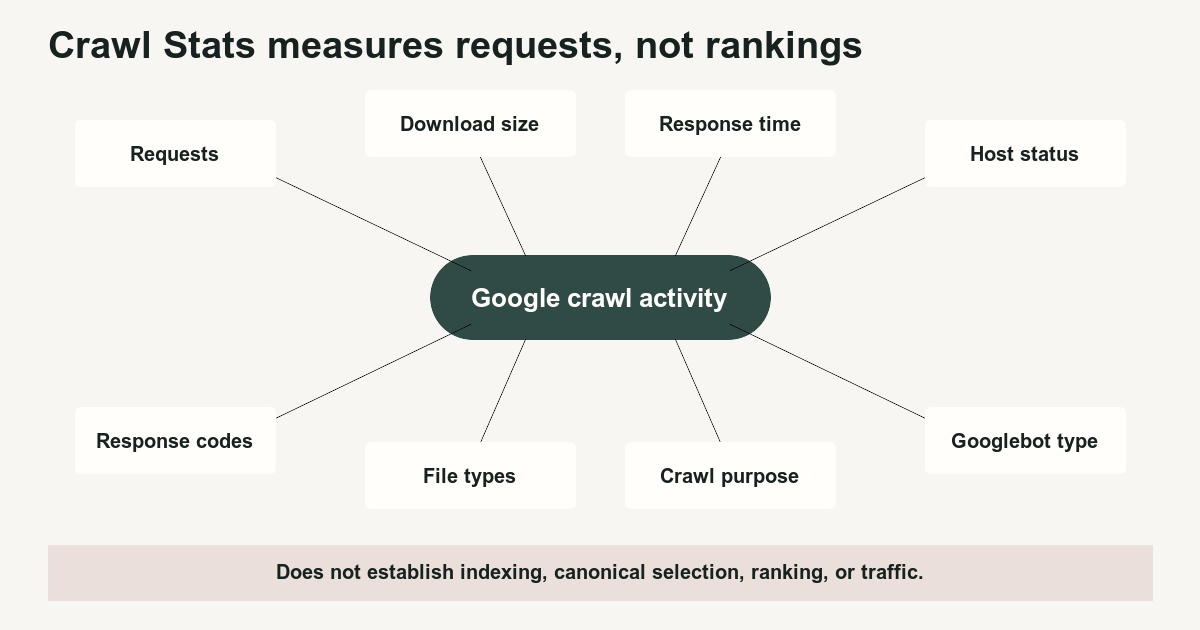
The Crawl Stats report summarizes Google's requests, download volume, response time, host availability, response types, resource types, crawl purpose, and crawler types. It does not establish indexing, canonical selection, ranking, clicks, or conversions.
- Crawl Stats reports request activity rather than search-performance outcomes.
- The report counts requested URLs rather than assigning requests to canonical URLs.
- Discovery and refresh describe crawl purpose, not whether a page entered or remained in the index.
- Server logs are required when exact request-by-request evidence matters.
01
Preconditions
Use the Crawl Stats report when the question concerns Google crawling history or serving conditions.
Good questions include:
- Did Google request more URLs after a release?
- Did server errors rise during a crawl spike?
- Is the host responding more slowly?
- Is Google requesting many redirects?
- Which file types are being fetched?
- Did discovery crawling increase after new content launched?
- Which Googlebot type produced the requests?
Poor questions include:
- Did the page rank?
- Was the page selected as canonical?
- Did Google render the page successfully?
- Did the page enter the index?
- Did users click the result?
- Did a ranking update affect the site?
Google describes Crawl Stats as advanced reporting and says smaller sites with fewer than roughly 1,000 pages usually do not need this level of crawl detail. The report is available for root-level Domain or URL-prefix properties. Crawl Stats report[1]
Before investigating, record:
- Search Console property
- Hostname
- Date range
- Deployment and publishing dates
- Sitemap submissions
- Robots changes
- Server incidents
- CDN changes
- Log retention
A rise in requests with stable response time and low error rates may be normal after publishing. A rise in requests accompanied by slower responses and more 5xx errors requires infrastructure investigation.
Download size depends on which resources were requested and whether resources were cached. It is not a score that should always increase or decrease.
Use the downloadable Crawl Stats investigation template.
02
Ordered process
- Read the headline metrics together.
The report shows:
- Total crawl requests
- Total download size
- Average response time
- Inspect host status.
Host status summarizes significant availability problems involving:
- Robots.txt fetching
- DNS resolution
- Server connectivity
A recent warning deserves investigation. An older isolated warning may already be resolved.
Google counts some potential crawls abandoned because robots.txt was unavailable, even though the page request never occurred. This can make report totals exceed origin-log totals. Crawl Stats report[1]
- Break requests down by response.
Review:
200301and308302and307304404- Other
4xx 4295xx- DNS failures
- Timeouts
- Redirect errors
A response distribution is request-based. If Google requests one URL twice and receives 500 once and 200 once, each response contributes to the report.
- Inspect file types.
The report can group requests for:
- HTML
- Images
- JavaScript
- CSS
- XML
- JSON
- Feeds
- Other resources
A page-resource spike may reflect rendering resources rather than new HTML pages.
- Separate discovery from refresh.
Google defines:
- Discovery: The URL had not been crawled by Google before.
- Refresh: Google recrawled a known URL.
A discovery request does not establish indexing. A refresh request does not prove that Google accepted the current version.
A new section or sitemap submission may produce more discovery requests. Verify the actual example URLs and compare them with logs and indexing reports.
- Inspect Googlebot type.
Possible categories include smartphone, desktop, image, video, page-resource load, AdsBot, Storebot, and other agents.
Do not treat an AdsBot or user-triggered request as ordinary web-indexing activity. Use the log-analysis guide when crawler identity and category matter.
- Review example URLs carefully.
Example URLs are representative rather than comprehensive. A URL missing from the sample may still have been requested.
Crawl Stats counts actual requested URLs rather than assigning data to canonical URLs. Server-side redirect chains generate a separate request for every requested step on the current domain.
- Compare Search Console with request logs.
Expect some differences.
Reasons include:
- Search Console does not report every request
- Robots-unavailable potential crawls can appear without an origin request
- The Search Console property can include child hosts
- Origin logs may see a CDN rather than the original requester
- Edge-cached responses may not reach the origin
- Logging may exclude files or status classes
- Timezones and date boundaries may differ
- Client-side redirects do not appear as server-side redirect requests
- State the smallest defensible conclusion.
03
Failure cases
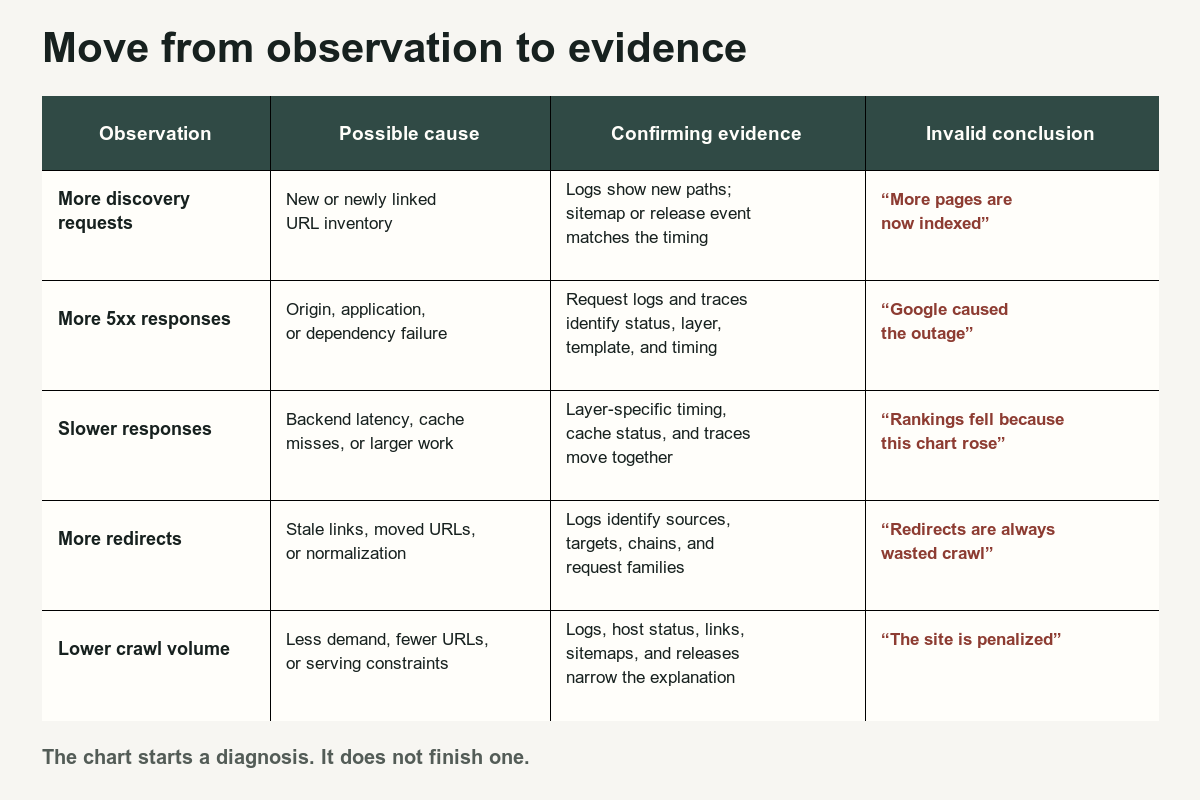
Do not interpret every decline as a penalty.
Google can crawl less because:
- Content changes less frequently
- Crawl demand falls
- URLs were consolidated
- Internal links changed
- Robots rules changed
- Responses slowed
- Server errors increased
- Duplicate inventory disappeared
- The selected reporting period differs
Do not interpret every increase as success.
Requests can rise because:
- Redirect chains remain linked
- Faceted navigation multiplied
- Error URLs are repeatedly requested
- Page resources increased
- AdsBot activity increased
- A migration exposed alternate hosts
- A new sitemap introduced low-value URLs
Do not use Crawl Stats as a substitute for URL Inspection, the Page Indexing report, rendered HTML inspection, analytics, or logs.
Google’s crawl-budget documentation describes crawl capacity and crawl demand as separate constraints and emphasizes that crawling does not guarantee indexing. Crawl budget management[2]
Prefer:
Verified Google crawl requests to category pages increased after the release, while response time and error rates remained stable.
Avoid:
Google loved the new section and will rank it.
04
Completion criteria
A Crawl Stats investigation is complete when it identifies:
- The exact observed change
- The affected host
- The affected dates
- Relevant response classes
- Relevant file and crawler types
- Example URLs
- Corresponding server or edge evidence
- Related deployment, sitemap, content, or robots events
- Competing explanations
- The next test
Use Crawl Budget: When It Matters before launching a broad crawl-efficiency project, Server Error 5xx for persistent server failures, Redirect Error for broken redirect paths, and Faceted Navigation SEO when parameterized filter requests dominate the report.
References
Sources behind this record
- Crawl Stats report — Google (accessed July 29, 2026)
- Crawl budget management — Google (accessed July 29, 2026)
Corrections
Correction history
No corrections recorded.
To report an error, use the public corrections path.
Search Console provides summarized and sampled reporting with known coverage differences, so its totals and examples should not be treated as a complete request ledger.