
Access logs can show that a request reached a recorded edge, proxy, server, or application layer and document the response recorded there. They cannot independently establish successful rendering, indexing, canonical selection, ranking, or search traffic.
- A Googlebot-looking User-Agent string is not proof that a request came from Google.
- Edge, proxy, origin, web-server, and application logs may describe different stages of one request.
- Preserve raw evidence before URL normalization or crawler classification.
- Every log analysis must document missing fields, exclusions, verification methods, and retention limits.
01
Preconditions
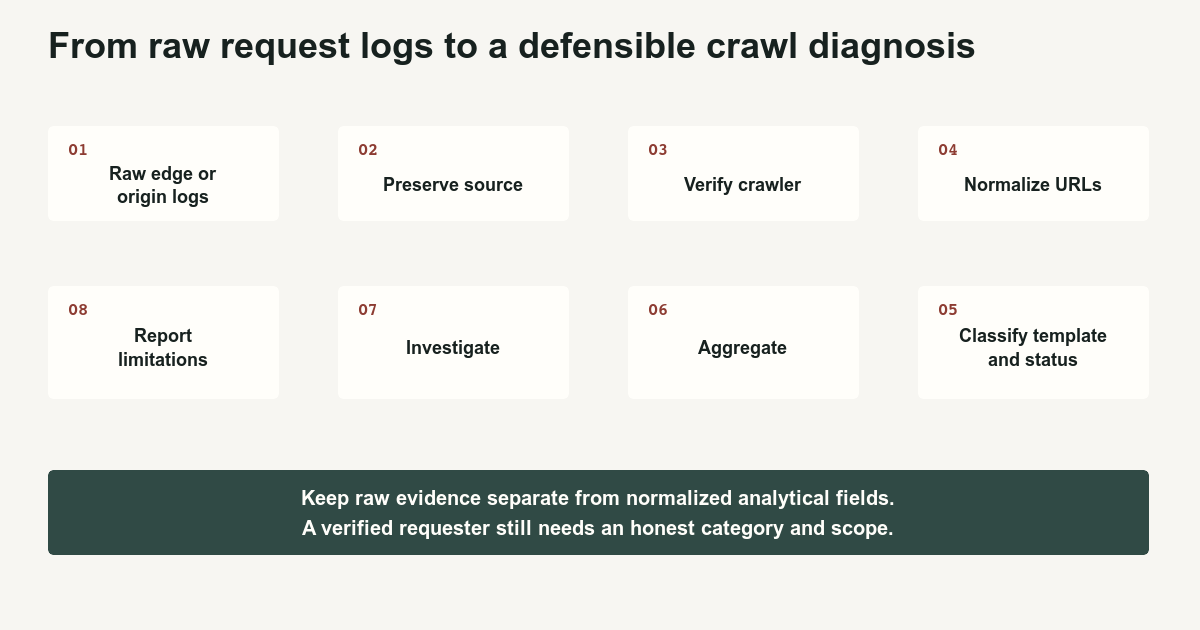
A log analysis begins by defining the question and the trust boundary.
Examples:
- Did verified Googlebot request the new article?
- Which templates return
5xxresponses to verified Google crawlers? - Are redirecting URLs still receiving internal crawl demand?
- Did faceted URLs consume a large share of verified requests?
- Did requests reach the edge but not the origin?
- Are crawler-labeled requests actually from Google?
Do not begin by importing every available field into a dashboard and waiting for meaning to emerge through decorative charts.
Identify the logging layer:
- CDN edge
- Reverse proxy
- Load balancer
- Web server
- Application
- Serverless function
- Storage service
An edge log may record a cache hit that never reaches the origin. An origin log may record the CDN’s address rather than the original client. An application log may omit blocked or failed requests that never reached application code.
Record:
- Analysis period
- Timezone
- Logging layer
- Retention
- Sampling
- Excluded paths
- Missing fields
- Proxy behavior
- Cache behavior
- Privacy restrictions
Use the Googlebot log analysis template, field dictionary, verification checklist, and crawl evidence report template.
02
Ordered process
- Preserve the raw source.
Store an immutable copy of the permitted export before filtering or normalization.
Record:
- Export time
- Source system
- Query or job configuration
- Included fields
- Excluded fields
- Row count
- Time range
- Checksum when available
Never overwrite the raw path with a normalized URL.
- Understand the available fields.
Apache’s common access format can record the requester, timestamp, request line, final status, and response size. Its combined format adds the reported referrer and User-Agent. Log Files - Apache HTTP Server Version 2.4[3]
NGINX supports configurable logging and exposes variables including status, bytes sent, ISO timestamps, request length, and request-processing time. Module ngx_http_log_module[4]
Cloudflare’s HTTP request dataset can include edge-level client, request, response, bot, cache, host, path, method, scheme, timing, and security fields, subject to product and plan availability. HTTP requests dataset[5]
Do not pretend a missing field exists. Store null and describe the limitation.
- Select the trusted requester address.
The address visible to the application may belong to a proxy.
Determine:
- Which layer first receives the external request
- Whether trusted forwarding headers exist
- Whether the logging system validates those headers
- Whether an attacker can supply an untrusted client-IP header
Verify crawlers using the source IP from the trusted layer.
- Verify Google requests.
A User-Agent string can be copied by anyone.
Google supports two verification approaches:
- Match the source IP against its published crawler and fetcher IP ranges.
- Perform reverse DNS and then a forward DNS lookup, confirming that the hostname belongs to the documented Google domains and resolves back to the original IP.
Verify requests from Google crawlers and fetchers[1]
Store:
- Verification result
- Verification method
- Verification time
- Matched range or hostname category
- Classify the verified Google request.
Google separates:
- Common crawlers
- Special-case crawlers
- User-triggered fetchers
Common crawlers include ordinary Googlebot activity. Special-case crawlers serve particular products such as advertising systems. User-triggered fetchers act after a user initiates a tool or product function. Overview of Google crawlers and fetchers[2]
Do not group every verified Google address under “Googlebot SEO crawl.”
- Normalize URLs without destroying evidence.
Preserve:
- Raw method
- Raw host
- Raw path
- Raw query
- Raw status
Create separate normalized fields for:
- Scheme
- Hostname
- Default ports
- Case
- Trailing slash
- Parameter order
- Tracking parameters
- Canonical group
- Redirect target
- Template
Document every rule.
- Build analysis dimensions.
Add site-specific classifications:
- Page template
- Directory
- Content type
- Lifecycle state
- Canonical group
- Parameter family
- Response class
- Cache status
- Publication age
- Sitemap presence
- Internal-link presence
- Calculate request patterns.
At minimum examine:
- Requests by day
- Requests by verified crawler category
- Status distribution
- Requests by URL
- Requests by template
- First and most recent observed request
- Redirecting URLs requested
- Removed URLs requested
- Parameter families
- Faceted combinations
429and5xxconcentrations- Response-time distribution
- Sitemap URLs never observed during the available period
- Log-observed URLs absent from the internal crawl
- Internal-crawl URLs absent from logs
- Edge and origin differences
- Investigate the question rather than the dashboard.
For an indexing complaint:
- Was the canonical URL requested?
- Which crawler category requested it?
- What status was returned?
- Did the request reach the origin?
- Was the response unexpectedly small?
- Did it redirect?
- Were required resources failing?
- Does URL Inspection show the same version?
For a crawl spike:
- Which agent category increased?
- Which URL family increased?
- Did response time change?
- Did errors change?
- Did a release generate new links?
- Did a parameter family multiply?
- Compare with Crawl Stats.
Search Console and logs can differ because:
- Crawl Stats is summarized
- Some requests may not be represented
- Potential crawls abandoned by robots.txt unavailability can be counted
- Edge cache hits may not reach the origin
- Properties may include child hosts
- Logging can exclude resources
- Timezones can differ
- Crawler verification can exclude spoofed requests
Use Google Search Console Crawl Stats for the reporting model.
- Publish a bounded conclusion.
Separate:
Observed
During the seven-day period, 84,000 requests passed common-crawler verification. Of those, 18,000 requested redirecting URLs and 2,400 received
5xxresponses, with 87 percent of those failures concentrated in the category template.
Inferred
The concentration suggests a template-level serving problem rather than uniform site failure.
Not established
The logs do not establish whether the affected pages were indexed, ranked, or shown to users.
03
Failure cases
Do not trust a Googlebot-looking User-Agent.
Do not match IPs against an old copied list indefinitely. Use current official ranges or current forward-confirmed reverse DNS.
Do not treat all verified Google requests as common indexing crawls.
Do not merge edge and origin rows without a request identifier or documented reconciliation method. One external request can create several internal records.
Do not treat absence from a short log window as proof that Google has never crawled a URL.
Do not claim that a request reached the origin when only an edge record exists.
Do not publish raw client IP addresses unnecessarily.
Do not store more personal data than the analysis requires.
Do not normalize away parameter states before preserving the raw query.
Do not compare Search Console and logs without aligning hosts, protocols, dates, timezones, resource classes, and crawler categories.
Do not claim that a 200 response proves the correct content was served. Inspect response size, rendering evidence, and page output where necessary.
04
Completion criteria
A defensible report includes:
- Exact question
- Analysis period
- Logging layers
- Retention and sampling
- Raw row count
- Crawler-verification method
- Included and excluded crawler categories
- URL-normalization rules
- Direct observations
- Alternative explanations
- Missing evidence
- Privacy controls
- Reproducible calculations
- Next test
Use Crawl Budget: When It Matters before treating request distribution as a fixed budget problem, Server Error 5xx for persistent origin failures, Redirect Error for broken paths, and Faceted Navigation SEO when filter URLs dominate request volume.
Logs are valuable because they replace guesses with records. They remain records of requests at one layer, not transcripts of the entire search system.
References
Sources behind this record
- Verify requests from Google crawlers and fetchers — Google (accessed July 29, 2026)
- Overview of Google crawlers and fetchers — Google (accessed July 29, 2026)
- Log Files - Apache HTTP Server Version 2.4 — Apache Software Foundation (accessed July 29, 2026)
- Module ngx_http_log_module — NGINX (accessed July 29, 2026)
- HTTP requests dataset — Cloudflare (accessed July 29, 2026)
Corrections
Correction history
No corrections recorded.
To report an error, use the public corrections path.
A log record is evidence about the layer and fields that produced it; it is not a complete record of later search-system processing or user-visible search outcomes.