
When a public URL must change, permanently redirect the old address to the closest equivalent new address, update every controllable reference to the new URL, remove contradictory canonical and sitemap signals, and verify both the redirect and the new page.
- Change a URL only when the long-term benefit justifies migration work.
- Map one old page to its closest useful replacement rather than the homepage.
- Update internal links and metadata so the redirect becomes a fallback rather than the site's normal navigation.
- Return 404 or 410 when no meaningful replacement exists.
01
Definition
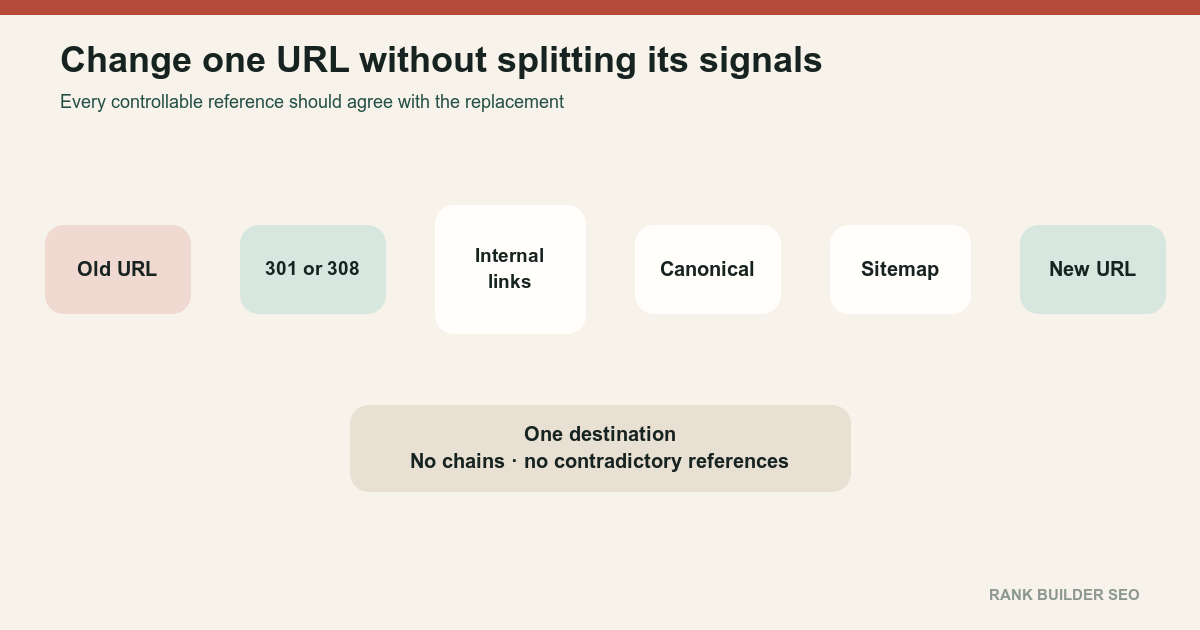
Changing a public URL creates a new address.
Even when the visible content remains identical, these are different URLs:
https://www.example.com/old-guide
https://www.example.com/new-guide
The old URL may already have:
- Search history
- External links
- Internal links
- Bookmarks
- Analytics records
- Sitemap inclusion
- Canonical signals
- Social shares
- Cached copies
The new URL begins without that exact address history.
A permanent redirect connects the old address to the new one. Google describes permanent server-side redirects as strong signals that the target should become canonical. Redirects and Google Search[2]
Do not change URLs for cosmetic reasons every time an editor improves a title. Stable addresses are operational assets.
02
Mechanism
A controlled URL change aligns six systems:
- Old URL
- Redirect
- New URL
- Internal links
- Canonical metadata
- Sitemap and discovery sources
The preferred state is:
Old URL
  └─ 301 or 308 → New URL
                    ├─ 200 response
                    ├─ Self-canonical
                    ├─ Internal links
                    └─ Sitemap inclusion
Choose a real replacement
The destination should satisfy substantially the same user need.
Good mapping:
/guides/old-widget-setup
    → /guides/widget-installation
Poor mapping:
/guides/old-widget-setup
    → /
Google advises against redirecting many unrelated old URLs to one irrelevant destination because the result can confuse users and be treated as a soft 404. How to move a site[1]
Use a permanent server-side redirect
Use 301 or 308 when the move is intended to remain permanent. [2]
The new URL should return its final content directly. Avoid:
Old URL
  → intermediate URL
  → alternate hostname
  → final URL
A chain creates extra requests, latency and additional failure points.
Update controllable references
Replace the old URL in:
- Navigation
- Body links
- Breadcrumbs
- Related content
- Canonicals
- Structured data
- Hreflang
- XML sitemaps
- Feeds
- Social metadata
- Forms
- Documentation
- Advertising destinations
Internal links should point directly to the new URL rather than relying on the redirect forever.
Keep the content relationship clear
A URL change is easiest to process when the destination remains equivalent.
If the page simultaneously changes topic, language, purpose and content, the redirect still routes users, but equivalent ranking behavior should not be assumed.
Request recrawling proportionately
For a small number of high-value changed URLs, use URL Inspection after verifying the redirect and destination.
For many changed URLs, submit an accurate sitemap containing the new canonical URLs. Repeatedly requesting the same URL does not make crawling faster. Ask Google to recrawl your URLs[3]
03
Examples
Rename one article
Old:
/articles/basic-widget-tipsNew:
/articles/widget-maintenance-guideImplementation:
- Permanent redirect old to new
- New page returns
200 - New page self-canonicalizes
- Internal links use new slug
- Sitemap contains new URL
- Old URL removed from sitemap
Move a section
Old:
/blog/*New:
/articles/*Do not use one wildcard redirect that blindly preserves every suffix until the mapping has been tested.
Some pages may be:
- Renamed
- Consolidated
- Removed
- Already redirecting
- Missing a replacement
Build a row-level map with Redirect Mapping for Site Migrations.
Consolidate several pages
Old:
/guides/widget-cleaning
/guides/widget-storage
/guides/widget-inspection
New:
/guides/widget-maintenanceSeveral old pages may redirect to one consolidated guide when the new guide genuinely replaces each one.
The destination should contain the useful substance readers expected from all three sources.
Remove a page
When no useful replacement exists:
/obsolete-event-2021 → 410or:
/obsolete-event-2021 → 404Do not send every removed page to a category merely to avoid an error response.
04
Boundaries
A redirect is not required when both URLs should remain independent pages.
Use a canonical instead when:
- Both versions must remain accessible
- Their primary content is duplicate or substantially similar
- One should be the preferred search representative
Use a temporary redirect when the alternate destination is genuinely temporary.
Use authentication when the content is private.
Use noindex when the page remains public but should not appear in search.
See Page With Redirect when Search Console reports the old URL as redirecting. That status is expected when the redirect is intentional.
Check these failure patterns:
- Redirect loop
- Redirect chain
- Redirect to unrelated homepage
- New URL returning
404 - New URL canonicalizing to old URL
- Old URL still in sitemap
- Internal links still use old URL
- Redirect present only in client-side JavaScript
- Mobile and desktop variants disagree
- Query parameters are dropped incorrectly
- Alternate languages map to the wrong language
- Redirect removed after several weeks
A URL change is complete when the new address owns the content, the old address routes directly to it, and every controllable signal refers to the new address.
References
Sources behind this record
- How to move a site — Google (accessed July 30, 2026)
- Redirects and Google Search — Google (accessed July 30, 2026)
- Ask Google to recrawl your URLs — Google (accessed July 30, 2026)
Corrections
Correction history
No corrections recorded.
To report an error, use the public corrections path.
A technically correct redirect transfers strong signals, but it cannot guarantee identical rankings when the destination, content, intent or surrounding site structure also changes.